
Linux always stores three timestamps — access time, modification time, and permission change time. But creation date is not part of the POSIX standard, which is why file managers do not show it. It is there though — just buried a bit deeper.
Why Creation Date Is Not Visible by Default
The POSIX standard defines three file timestamps:
atime— last access time (read)mtime— last content modification timectime— last metadata change time: permissions, owner
Creation date (crtime or btime) is a fourth timestamp that POSIX does not require. Old filesystems do not store it at all; modern ones store it in their own field:
| Filesystem | Field |
|---|---|
| ext4 | crtime |
| XFS | crtime |
| ZFS | crtime |
| Btrfs | otime |
| JFS | di_otime |
On ext4, xfs, and btrfs creation date is always stored — you just need the right tools to read it.
Method 1: stat — Fast but Not Universal
The stat utility outputs all file metadata including creation date:
stat /path/to/file.txt
Look for the Birth field in the output. If it shows a dash - — either the filesystem does not support crtime, or the stat version is too old.
Output only the creation date:
stat -c '%w' /path/to/file.txt
%w is the format specifier for creation date. If an empty string is returned — use method 2.
Why stat may not show creation date
Support for crtime in stat arrived in GNU coreutils 8.31 (via the statx syscall in glibc 2.28). On Ubuntu 20.04 the field is empty — coreutils there is version 8.30. On Ubuntu 22.04 and 24.04 it works correctly.
Check the version:
stat --version
Method 2: debugfs — Universal, Works Everywhere
debugfs is the ext2/ext3/ext4 filesystem debugger. It works regardless of glibc or coreutils version. Three steps needed.
Step 1: get the file's inode number
ls -i /path/to/file.txt
The number at the start of the line is the inode. Note it down.
Step 2: find the filesystem device
df /path/to/file.txt
The Filesystem column shows the device name — for example /dev/sda5 or /dev/nvme0n1p2.
Step 3: run debugfs with the inode
sudo debugfs -R 'stat <INODE>' /dev/sda5
Replace INODE with the number from step 1 and /dev/sda5 with the device from step 2.
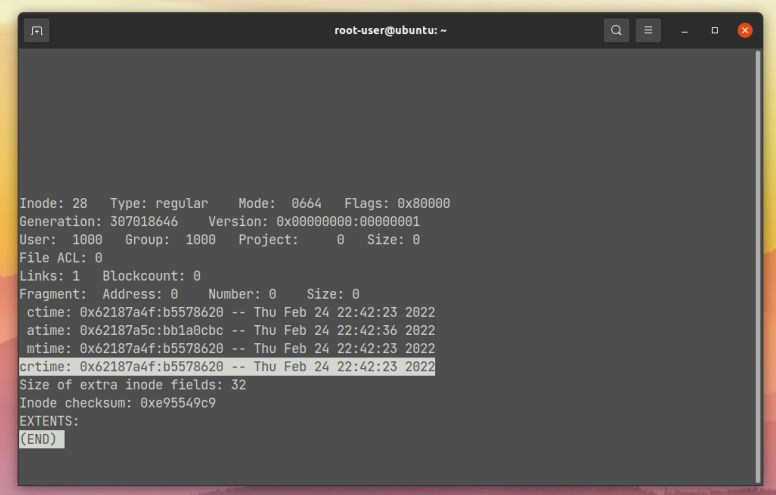
Find the crtime line in the output — that is the file creation date.
Method 3: xstat / statx — for XFS and Btrfs
On XFS partitions debugfs does not work — it is ext-only. Use xstat from the xfsprogs package:
sudo apt install xfsprogs
xstat /path/to/file.txt
Or via Python with a direct statx syscall — works on any modern filesystem:
python3 -c "
import ctypes, os
STATX_BTIME = 0x800
class Timespec(ctypes.Structure):
    _fields_ = [('tv_sec', ctypes.c_int64), ('tv_nsec', ctypes.c_uint32)]
class Statx(ctypes.Structure):
    _fields_ = [('stx_mask', ctypes.c_uint32), ('stx_blksize', ctypes.c_uint32),
                ('stx_attributes', ctypes.c_uint64), ('stx_nlink', ctypes.c_uint32),
                ('stx_uid', ctypes.c_uint32), ('stx_gid', ctypes.c_uint32),
                ('stx_mode', ctypes.c_uint16), ('__spare0', ctypes.c_uint16),
                ('stx_ino', ctypes.c_uint64), ('stx_size', ctypes.c_uint64),
                ('stx_blocks', ctypes.c_uint64), ('stx_attributes_mask', ctypes.c_uint64),
                ('stx_atime', Timespec), ('stx_btime', Timespec),
                ('stx_ctime', Timespec), ('stx_mtime', Timespec)]
libc = ctypes.CDLL(None)
buf = Statx()
libc.statx(0, b'/path/to/file.txt', 0, STATX_BTIME, ctypes.byref(buf))
import datetime
print(datetime.datetime.fromtimestamp(buf.stx_btime.tv_sec))
"
One-liner for Quick Check
Get file creation date in one command — inode and device are detected automatically:
sudo debugfs -R "stat <$(ls -i /path/to/file.txt | awk '{print $1}')>" $(df /path/to/file.txt | tail -1 | awk '{print $1}') 2>/dev/null | grep crtime
Replace /path/to/file.txt with the actual path — the rest is handled automatically.
Quick Reference
| Task | Command |
|---|---|
| All timestamps including creation | stat /path/to/file |
| Creation date only (stat) | stat -c '%w' /path/to/file |
| stat version | stat --version |
| File inode number | ls -i /path/to/file |
| Filesystem device | df /path/to/file |
| Creation date via debugfs | sudo debugfs -R 'stat <INODE>' /dev/sdaX |
| Only crtime line | sudo debugfs -R 'stat <INODE>' /dev/sdaX 2>/dev/null | grep crtime |