You see an unfamiliar device in your router — but have no idea what it is. Or you need to inventory all machines on the network before maintenance. Or you want to confirm that no unauthorized devices are connected to the corporate network. In all these cases, ARP scanning gives a faster and more reliable answer than ping — because devices can block ICMP, but hiding from ARP is practically impossible.
How ARP Works and Why It Cannot Be Fooled
ARP (Address Resolution Protocol) lets devices on a local network find each other by MAC address when only the IP is known. When a computer wants to send a packet to an IP on the same subnet, it broadcasts to the entire network: 'Who has 192.168.0.50?' Every device hears this. The owner of that address replies: 'Me — my MAC is xx:xx:xx:xx:xx:xx.' The reply is cached in the ARP table.
The key property of ARP: the protocol operates at the data link layer and does not use routing. This means arp-scan only discovers devices on the same subnet — but it finds all of them, including those configured to block ping or refusing TCP connections.
View the current ARP table:
arp -a
Or with the modern command:
ip neigh show
Install arp-scan
arp-scan is a specialized ARP scanning utility that works with raw sockets and requires superuser privileges.
Debian/Ubuntu:
sudo apt install arp-scan
Fedora/RHEL:
sudo dnf install arp-scan
Arch Linux:
sudo pacman -S arp-scan
Identify the Network Interface Before Scanning
The name of the active network interface is needed before scanning:
ip addr list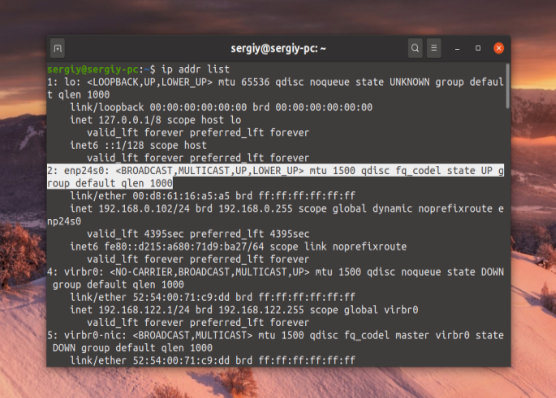
Look for an interface with an assigned IP address and UP status. Typical names: eth0, enp24s0, ens3 for wired; wlan0, wlp3s0 for wireless. On VPS instances it is usually eth0 or ens3.
Scan the Entire Local Network
Run a scan with automatic IP range detection for the current subnet:
sudo arp-scan --interface=enp24s0 --localnet
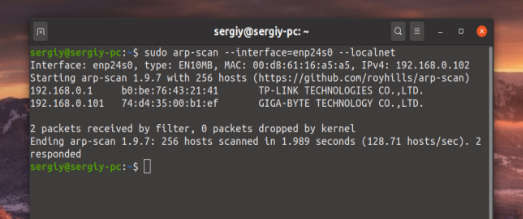
--localnet automatically calculates the scan range from the interface IP and subnet mask. If the interface has address 192.168.0.102/24, the entire range 192.168.0.0–192.168.0.255 is scanned.
If --interface is omitted, arp-scan selects the interface with the lowest system number automatically.
Specify a Range Manually via Subnet Mask
Use CIDR notation instead of --localnet:
sudo arp-scan --interface=enp24s0 192.168.0.0/24
For a /16 subnet (65534 hosts):
sudo arp-scan --interface=enp24s0 10.0.0.0/16
For a specific range:
sudo arp-scan --interface=enp24s0 192.168.1.1-192.168.1.50
Reading the arp-scan Output
Typical output:
Interface: enp24s0, type: EN10MB, MAC: 00:d8:61:16:a5:a5, IPv4: 192.168.0.102
Starting arp-scan 1.9.7 with 256 hosts

192.168.0.1     b0:be:76:43:21:41       TP-LINK TECHNOLOGIES CO.,LTD.
192.168.0.101   74:d4:35:00:b1:ef       GIGA-BYTE TECHNOLOGY CO.,LTD.

2 packets received by filter, 0 packets dropped by kernel
Ending arp-scan 1.9.7: 256 hosts scanned in 1.989 seconds. 2 responded
Three columns: IP address, MAC address, manufacturer (determined from the first 3 bytes of the MAC using the IEEE OUI database). The manufacturer helps quickly identify the device type: router, laptop, printer, smart home device, etc.
If the same IP shows two different MAC addresses, ARP spoofing may be occurring.
Useful arp-scan Flags
Retry each request N times to reduce missed devices:
sudo arp-scan --interface=enp24s0 --localnet --retry=3
Save output to a file for later comparison:
sudo arp-scan --interface=enp24s0 --localnet > scan_$(date +%Y%m%d).txt
Alternative: nmap with ARP Discovery
nmap can perform ARP scanning with the -PR flag:
sudo nmap -sn -PR 192.168.0.0/24
-sn disables port scanning, -PR uses ARP for host discovery. Output includes active hosts with hostnames if DNS resolves.
Why ARP May Not Work: Common Problems
IP address conflict. Two devices sharing one IP create unpredictable results: arp-scan may show both MAC addresses for one IP, or only one of them. The DUP marker in output indicates this.
ARP spoofing (ARP poisoning). An attacker sends forged ARP replies, binding their MAC to someone else's IP. Visible in arp-scan output as duplicate entries. Use arpwatch to detect changes:
sudo apt install arpwatch
sudo systemctl enable --now arpwatch
arpwatch monitors the ARP table and sends a notification on every IP/MAC pair change.
Wrong subnet mask. If the interface is configured with /32, --localnet scans nothing. Check the mask:
ip addr show enp24s0
Switch-level filtering. Some managed switches filter ARP between VLANs. Scanning will only return results within the same VLAN.
Quick Reference
| Task | Command |
|---|---|
| Install arp-scan | sudo apt install arp-scan |
| View interfaces | ip addr list |
| Scan entire subnet | sudo arp-scan --interface=eth0 --localnet |
| Scan specific range | sudo arp-scan --interface=eth0 192.168.0.0/24 |
| View ARP table | arp -a or ip neigh show |
| Save scan results | sudo arp-scan --localnet > scan.txt |
| ARP scan via nmap | sudo nmap -sn -PR 192.168.0.0/24 |
| Monitor ARP changes | sudo systemctl enable --now arpwatch |